

- A planned date and green status do not prove ERP go-live readiness.
- Review six areas: critical processes, data, integrations, cutover, people and governance.
- A conditional GO is for demonstrably controlled, non-critical exceptions.
- Document the evidence, risk acceptance, owners and final decision.
A go-live date is not proof that the business is ready. Your implementation can be marked green while teams still cannot ship an order, post an invoice or reconcile opening balances in the new ERP. Executives need a documented decision based on evidence, not a confident status report.
The ERP go/no-go decision asks a different question from the cutover plan: can critical operations run with a level of residual risk the organization has explicitly accepted? The ERP cutover plan explains how to switch systems. This guide explains whether you should authorize the switch.
Six evidence checks before you give the green light
For each area, require an observable artifact, an acceptance criterion and an accountable owner. Adapt thresholds to the business. The matrix is an editorial decision framework, not a universal release standard.
| Decision gate | Evidence to review | Accountable owner | Possible stop signal |
|---|---|---|---|
| 1. Critical business processes | End-to-end test results for orders, receiving, shipping, invoicing, payments, exceptions and period-end close; business sign-off. | Process owners | A core workflow fails on representative scenarios. |
| 2. Migrated data | Reconciled opening balances, inventory, open orders and master records; explained variances and agreed tolerances. | Finance and data owners | Material financial or inventory discrepancies remain unexplained. |
| 3. Integrations and access | Critical interfaces, retries, error-handling, volume tests and role-based permissions verified. | IT and security owners | A key integration fails, or real users lack safe access. |
| 4. Cutover and recovery | Timed cutover rehearsal, step-by-step responsibilities, checkpoints and viable contingency/recovery procedure. | Cutover lead | No tested path to pause, recover or maintain essential operations. |
| 5. People and support | Key users trained; procedures, help desk, escalation and hypercare coverage ready for launch. | Operations and change leads | A critical team cannot operate without improvised support. |
| 6. Governance and acceptance | Approved risk register, signed acceptance criteria, named final decision-maker and backup. | Executive sponsor | A material exception has no owner or authorized risk decision. |
These checks are consistent with the topics in Microsoft's Dynamics 365 go-live checklist. They are adaptable governance considerations, not Dynamics-specific requirements imposed on every ERP.
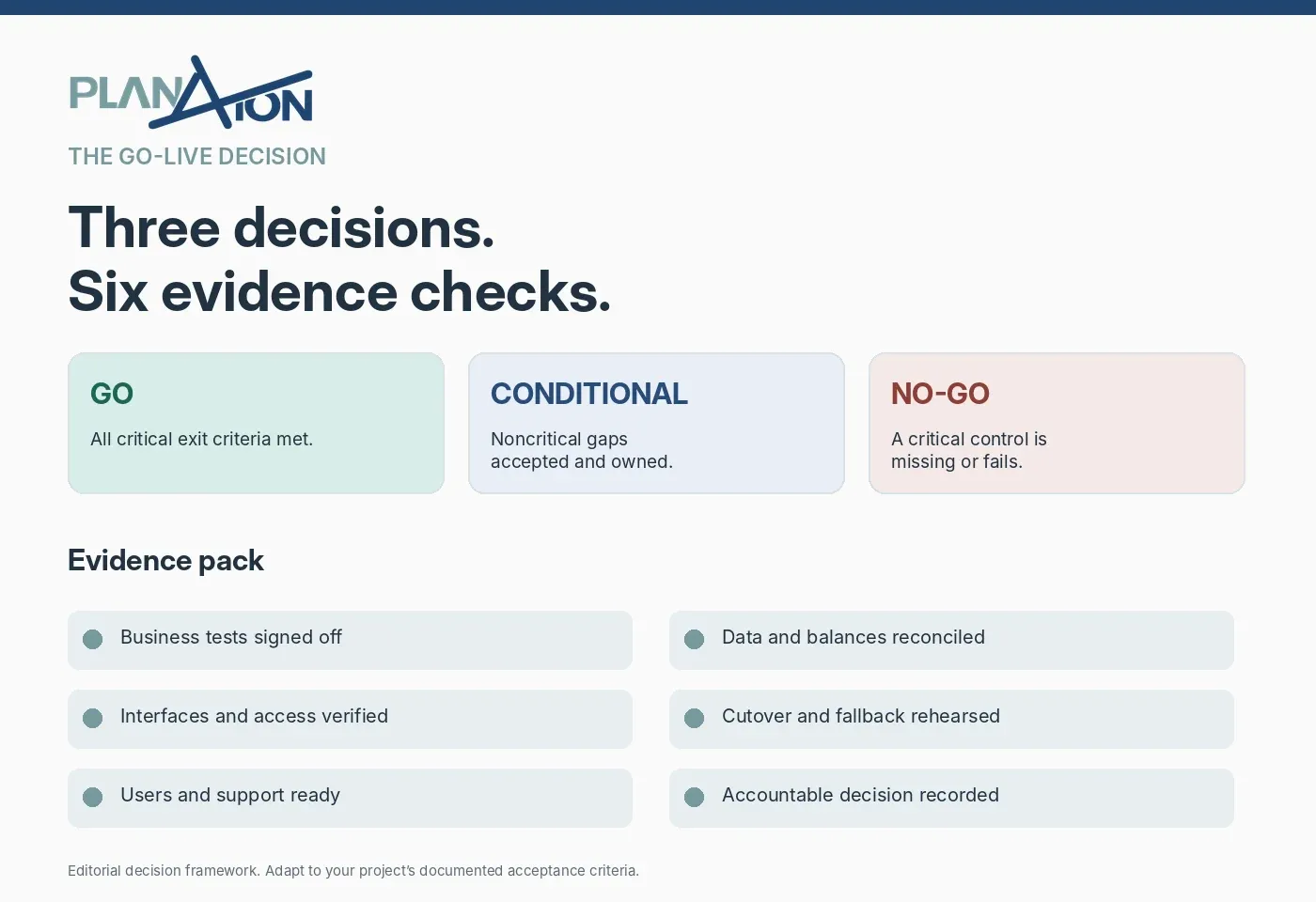
GO, conditional GO or NO-GO?
GO: critical gates are met
Authorize go-live when the agreed critical processes and controls have passed, exceptions are documented, owners have accepted the results and the business is ready to operate. The decision should name who approved what and when.
Conditional GO: only non-blocking exceptions remain
A conditional decision is not a loophole. It needs an explicitly accepted business risk, a proven workaround, a named owner, a due date and measurable monitoring. An unresolved critical defect does not become acceptable because somebody promised to fix it soon.
NO-GO: postpone with a recovery plan
Choose NO-GO when a control critical to operations, compliance or financial integrity is missing or failing. Document the blocker, business impact, accountable owner, corrective action and the evidence required before the next decision review.
Example: every dashboard is green except real-world shipping
Illustrative scenario, not a client case: the project passes its standard happy-path tests, users have attended training and the integrator has completed the data load. During a realistic end-to-end order, however, the warehouse cannot confirm shipment and generate the invoice because an external interface fails.
Do not approve a conditional GO on the basis of “the vendor is investigating.” First establish whether orders can be shipped and invoiced reliably, whether a tested workaround exists and who is authorized to accept the residual risk. If a core operation cannot run, postponing may be the defensible choice.
Put a one-page go/no-go decision in front of leadership
A useful decision record has seven columns: gate, criterion, observed result, evidence, residual risk, owner and approval. Add the cutover date, the next checkpoint and the escalation path. It prevents material reservations raised in a meeting from disappearing afterwards.
The integrator should provide delivery evidence and technical recommendations. Business leaders, Finance, Operations and IT determine whether the organization accepts the operational risk under its own approved governance. A vendor's green project status is not a substitute for client acceptance.
A practical 30-minute go/no-go meeting
- 5 minutes: confirm scope, business calendar, go-live window and approved decision gates.
- 10 minutes: review evidence and exceptions for the six areas above, not every line of the project plan.
- 10 minutes: decide which residual risks are acceptable, conditional or blocking.
- 5 minutes: record GO / conditional GO / NO-GO, approvers, actions, dates and next review.
Set thresholds early: acceptable reconciliation variance by data class, defect severity rules, transaction volumes, fallback time windows and support response criteria. Do not invent universal percentage targets for projects with different operating risks.
When independent advice adds value
If the integrator, internal IT and process owners disagree about readiness, an independent ERP review can help separate completed tasks from accepted evidence. PlanAxion works on the client side, without reselling software licences or receiving vendor commissions. The objective is a decision leadership can defend, not a promise of a problem-free go-live.
For sequencing and ownership, read the ERP cutover plan; for formal test planning, consult our ERP testing strategy. This page is deliberately about the authorization decision, not a second cutover checklist.
Frequently asked questions
Who makes the ERP go/no-go decision?
The executive or committee authorized by the organization's governance, informed by documented acceptances from IT, Finance, Operations and business process owners. It should never be implicit.
Must every defect be fixed before go-live?
Not necessarily. Agreed exit criteria should distinguish blocking defects from non-critical issues. Each accepted exception needs a business owner, mitigation and deadline.
How is go/no-go different from cutover?
Cutover is the sequence of activities that moves the business to the new system. Go/no-go is the evidence-based approval to execute that sequence.
- Microsoft Learn: Go-live readiness checklist, accessed November 10, 2026.
- Microsoft Learn: cutover strategy and go/no-go decision, accessed November 10, 2026.
- PlanAxion: ERP cutover plan.
This PlanAxion editorial framework is not an official Microsoft standard or a universal readiness threshold.